Taxed tokens: why fee-on-transfer swaps fail and how to fix them
INSUFFICIENT_OUTPUT_AMOUNT, Pancake: K, TRANSFER_FROM_FAILED: what these swap errors mean, why taxed tokens cause most of them and how to swap them safely.
You press swap, your wallet thinks for a moment, and then the transaction fails with something like PancakeRouter: INSUFFICIENT_OUTPUT_AMOUNT or Pancake: K. You lose a little gas and gain nothing. On BNB Chain, one of the most common reasons is a token that takes a cut every time it moves.
This guide explains how those taxed or fee-on-transfer tokens work, why they break ordinary swaps, what each common error message means and how to trade such tokens without either failing or overpaying.
What a transfer tax does
A normal token moves exactly the amount you send. A taxed token keeps part of each transfer and sends it somewhere else: a treasury, a burn address, other holders or a liquidity pool. Uniswap's documentation describes these tokens as ones that "burn or divert part of each transfer, so the recipient receives less than the sender transfers."
PancakeSwap's swap FAQ notes that such fees are not uncommon on BNB Smart Chain, and that they affect the input and output amounts you agree to when you sign. Many tokens tax buys and sells differently, and some owners can change the rate later.
Why swaps fail: a worked example
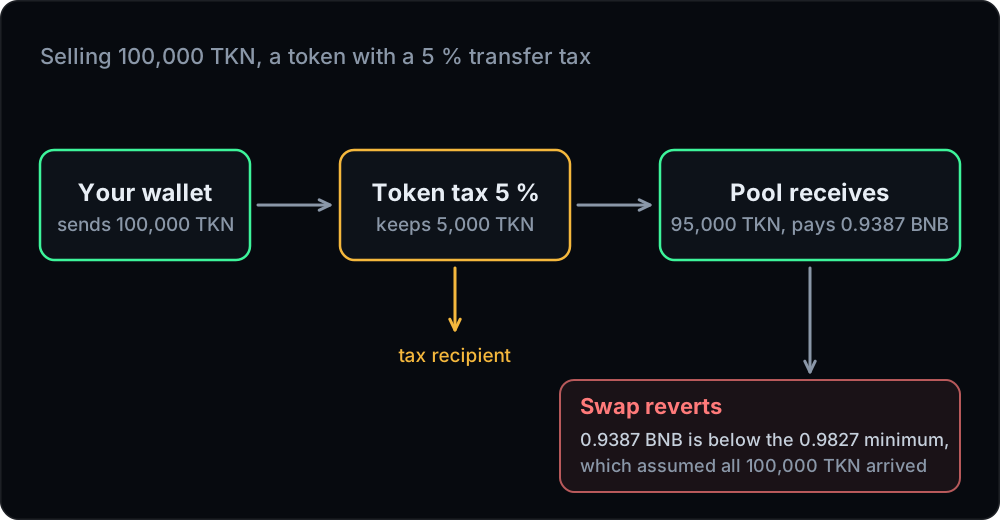
Take a pool with 10,000,000 TKN and 100 BNB that charges 0.25 % per trade. TKN has a 5 % tax on every transfer. You want to sell 100,000 TKN.
A quote that ignores the tax assumes all 100,000 TKN reach the pool and promises 0.98765 BNB. With 0.5 % slippage, your minimum becomes 0.98271 BNB.
What actually happens: the token keeps 5 % on the way in, so only 95,000 TKN arrive. The pool pays for 95,000, which is 0.93873 BNB, about 5 % less than promised. That is far below your minimum, so the swap reverts.
Buying has the same problem in reverse. Spend 1 BNB and the pool sends out 98,765 TKN, but the 5 % tax on the way to you leaves 93,827 in your wallet. A router that checks your received balance against a minimum of 98,271 reverts.
The fix is not mysterious. The quote has to know about the tax, and your slippage has to leave room for it.
Decoding the error messages
These are the strings you will meet most often. The Pancake ones are present in the live PancakeSwap V2 router and pool contracts on BNB Chain, and IIA comes from the Uniswap V3 pool code.
PancakeRouter: INSUFFICIENT_OUTPUT_AMOUNT: the router's minimum output check failed. Usually your slippage was too low for the price move, or the quote did not include a tax.Pancake: K: the pool's constant-product check failed after the swap. Typically a taxed token was sent through a function that assumes the full amount arrived.TransferHelper: TRANSFER_FROM_FAILED: the router could not pull your tokens. Usually a missing allowance or an insufficient balance, sometimes a token that blocks the transfer.Pancake: TRANSFER_FAILED: the pool could not send you the output token. Often a token that blocks transfers, one you can buy but not sell.PancakeRouter: EXPIRED: the deadline check failed. The transaction was signed or mined after its deadline.IIA: a V3 pool's input check failed. Too little input arrived in the pool, which is typical of a taxed token.
The Uniswap V2 versions read the same with UniswapV2Router and UniswapV2 in place of the Pancake names.
Why some pools cannot handle taxed tokens at all
Classic V2 routers have special swap functions for this case, whose names end in SupportingFeeOnTransferTokens. Instead of trusting the amount you sent, they measure what actually arrived in each pool and check the minimum against the balance the recipient really gained. That is why the same taxed token can fail through one function and succeed through another.
Concentrated-liquidity pools are stricter. Uniswap's documentation says fee-on-transfer tokens "will not function correctly on v3", because a V3 pool requires its balance to grow by the full input amount during the swap and reverts with IIA if it does not. PancakeSwap's FAQ likewise lists fee-on-transfer tokens as not supported on its V3 exchange and warns against adding them as liquidity there.
How much slippage a taxed token needs
PancakeSwap's advice is simple: set slippage to at least the tax plus normal trading slippage. For a 5 % tax that means roughly 5.5 % to 6 %. If a token taxes both buys and sells, remember that a round trip pays both.
There is a trade-off. Every percent of tolerance is also room for a sandwich bot. A swap with 6 % slippage on a thin pool is an attractive target, so use the smallest setting that works for that token and size. Our post on sandwich attacks shows how the numbers play out.
When no slippage setting will work
Some tokens fail at any slippage because they are built to. Security researchers call the extreme case a honeypot: a token you can buy but not sell. Common mechanisms, described by CertiK and in GoPlus Security's token risk documentation, include:
- a blacklist that blocks selling for chosen addresses, sometimes hidden behind a harmless-sounding function name,
- a sell tax of 100 %, or a tax the owner can raise at will,
- paused trading that only special addresses can bypass,
- maximum transaction or wallet limits the owner can shrink until every trade fails,
- an owner function that quietly resets your balance.
PancakeSwap's troubleshooting page says that when a scam token cannot be sold, it is not able to block the token or return funds. The same holds for any DEX or aggregator. Check before you buy. Our token checklist walks through what to look at.
How Tirio handles taxed tokens
We measure taxes rather than guess them.
- Probing. Before routing, Tirio probes tokens that are not hubs for buy and sell taxes and caches the result for ten minutes. A token can tax some pools and not others, for example only the pair it graduated to, so the tax is kept per pool.
- Quotes include the tax. A detected tax is built into the expected output and the minimum received, and the app says which side is taxed. If a tax could not be measured, the quote says so and the app warns that you may receive less than quoted.
- Pools that cannot take taxed input are skipped. A taxed input does not go to concentrated-liquidity pools that charge it a tax.
- Slippage nudge. When a quote involves a taxed token and your slippage is below 1 %, the app suggests 1 % and offers a one-click button. A higher tax still needs more.
- Where taxed tokens are not accepted. Buy mode (exact-out) needs an untaxed token to pay with, and limit, stop and DCA orders refuse taxed tokens entirely.
Every quote you sign is simulated as the complete transaction first, so a tax the probe missed usually shows up there before it costs you gas. The details are in our swapping guide.
A quick troubleshooting list
- Read the error string and match it in the table above.
- Find out whether the token is taxed, and by how much on each side. Check the project's own documentation and the token contract.
- Raise slippage to the tax plus a little, and no further.
- Try a smaller amount if price impact is high. Taxes and impact add up.
- Stop if it still fails at a sensible setting. A token that cannot be sold at 10 % slippage is telling you something.