Limit, stop-loss and DCA orders on tirio.io: a step-by-step guide
Orders are live on BNB Chain. How to place a limit order, a stop-loss with take-profit and a DCA schedule, what each field does and what it costs.
Since 2026-09-30 you can do more on tirio.io than swap at the market. You can leave an order that waits for your price, a stop that sells if the market turns, or a schedule that buys or sells a little at a time. All three run on BNB Chain through Tirio's Orders contract and fill through the same routing as a swap.
This guide walks through each order type in the app, field by field. If you want the concepts first (escrow, floors, keepers), our explainer on on-chain limit orders and DCA covers them.
Where to find orders
- On /swap, the head of the card has Swap, Limit and DCA tabs.
- On the trade page, the order panel has Market, Limit, Stop and DCA tabs, with a Buy and Sell switch.
On the trade page every price is written as the quote token per base token. On BNB/USDT that means USDT per BNB. When you buy, the price you type is the most you will pay per BNB. When you sell, it is the least you will accept.
Placing a limit order
A limit order sells an amount at your price or better.
- Choose the side and the amount.
- Set your price. Type it, or use the shortcuts: the current market price, or 1 %, 5 % or 10 % better than the market.
- Decide on partial fills. By default the order fills in one go or not at all. Switch on Allow partial fills and set a smallest fill if you are happy for it to fill in pieces.
- Choose an expiry. 1 hour, 1 day, 7 days (the default), 30 days, or a custom number of hours or days up to 364.
- Decide whether to list it on the order book. This is on by default. A listed order can be taken by any Tirio swap at exactly your price, as if it were a pool, which tends to fill it sooner. With the switch off, only the keeper fills it, at the best route it finds, and anything the route pays above your price goes to you.
- Place it. Your wallet approves or signs (see below) and sends one transaction that moves the tokens you sell into the Orders contract.
If your price is more than 5 % worse than the market, the form warns you in red, because the order would fill immediately and pay you less than a swap would right now. You have to press I understand before you can place it.
Placing a stop-loss, with an optional take-profit
Stop orders live on the trade page and always sell the pair's base token.
- Stop price. The order triggers when the best route for your whole remaining amount pays this price or less.
- Worst price. The lowest price the stop may sell at once it triggers. Left empty, it is 95 % of the stop price. If the market gaps below it, the order stays open rather than selling lower.
- Take-profit (optional). Tick Add take-profit and set a price above the stop. Both legs share the same tokens, so whichever fills first closes the order.
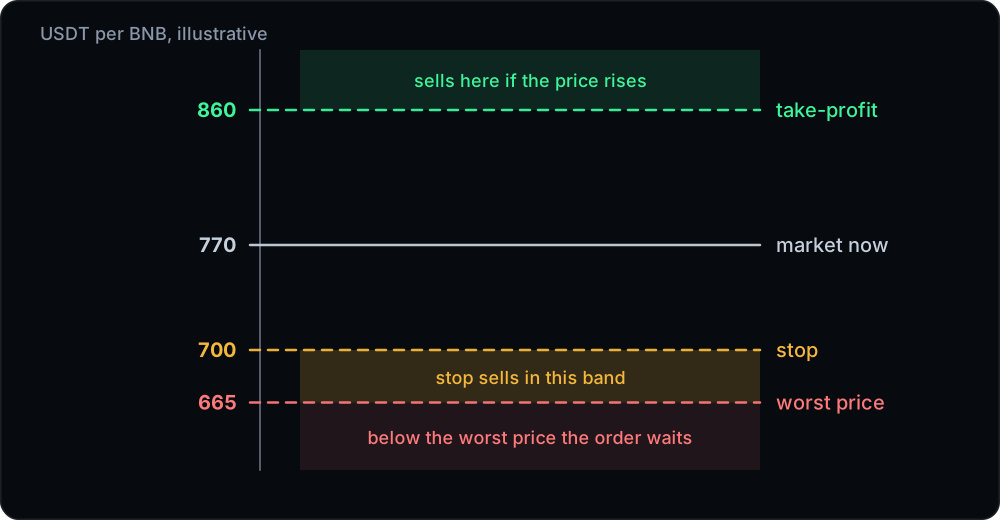
A trigger has to hold across three checks at least a second apart before the stop sells, and the last check simulates the full route, so a single-block spike in one pool does not fire it. The form warns if your stop is already at or above the market (it would sell at once) or your take-profit is already at or below it.
Setting up DCA
A DCA order buys or sells a total amount in equal slices on a schedule.
- Total and slices. Enter the total, then either the number of slices (at least two) or the amount per slice. The last slice takes whatever remains.
- Interval. Every hour, 4 hours, day (the default), week, or a custom number of minutes.
- First slice. Now, or after one interval.
- Price protection. A slice never fills at a worse price than this. Left empty, it is set from the market when you place the order: twice today's price when you buy, half of it when you sell, so no slice receives less than half of what the market pays at that moment.
- Optional second bound. A minimum price when you buy, a maximum when you sell. While the price is outside your range, a due slice waits and fills once the price comes back.
The expiry is set for you: twice the length of the schedule plus seven days, at most 364 days. Whatever has not been bought or sold by then is returned.
Approving and signing
An order uses the same approval paths as a swap, with the Orders contract as the spender. By default you approve the token to Permit2 once and sign for each order after that. Tokens that support EIP-2612 permits need only a signature. Otherwise you approve the Orders contract itself. Native BNB needs no approval at all and travels as the value of the transaction. Our guide to approvals and Permit2 explains the difference.
Managing your orders
Under the card, and on the trade page, the orders table lists your orders in three tabs.
- Open. Every open order, with Cancel. DCA orders also have Pause, Resume and Edit, where you can change the slices left, the interval and both price bounds. With more than one open order, Cancel all closes them in one transaction.
- History. Filled, cancelled and expired orders.
- Fills. Every order that has filled at least in part, with a link to all payouts on the explorer.
Cancelling returns what is left of an order to your wallet in the same transaction. An order past its expiry no longer fills, is marked Expired · refund pending, and is refunded, or you can cancel it yourself to get the tokens back at once. In the rare case a payout cannot be sent to your wallet, for example a contract wallet that rejects BNB, the amount waits under Waiting for you to claim with a Claim button.
What orders cost
- 10 bps (0.10 %) of what each fill receives, or 3 bps between stablecoins (USDT, USDC, USD1 and FDUSD on BNB Chain).
- Only when an order fills. Placing, cancelling and expiring cost nothing except the gas of your own transactions. The gas of every fill is paid for you.
- Your price is net of fees. The contract checks what reaches you after the fee against your price, so the price you type is the price you get.
- Improvement goes to you when the keeper fills, with no cap. Listed orders taken from the book fill at exactly your price.
- Partner links add their partner fee to orders too.
Placing an order costs roughly 390,000 to 510,000 gas depending on the token and approval path, and cancelling about 65,000 to 80,000.
A few practical limits
- $10 per order, or per DCA slice, is the suggested minimum. Smaller orders work, but gas weighs more heavily on them.
- Tokens with a transfer tax cannot be used in orders. The contract needs to know exactly what arrives.
- Set floors you would genuinely accept. The limit price, the stop's worst price and the DCA price protection are what the contract enforces in every case.
The full reference, including every field and what the contract guarantees, is in our orders documentation.