Token approvals, EIP-2612 permits and Permit2: what you are actually signing
Approve, permit or Permit2? What each lets a contract do with your tokens, how long it lasts, how signature phishing works and how to revoke old approvals.
Selling a token on a DEX usually starts with a strange extra step. Before the swap, your wallet asks you to "approve" the token, or to sign a message that is not a transaction at all. Most people click through. It is worth a few minutes to understand, because that click decides who can move your tokens, how many, and for how long.
This guide covers the three mechanisms you will meet on BNB Chain: the classic approval, the EIP-2612 permit and Uniswap's Permit2. Then it looks at how signatures get abused and how to clean up old approvals.
Why tokens need permission at all
Native BNB travels with your transaction as its value, so a swap of BNB needs no approval. BEP-20 tokens work differently. They follow the ERC-20 interface, and a contract can only move your tokens if you have given it an allowance first. The ERC-20 standard defines the pieces:
approve(spender, value)letsspenderwithdraw up tovaluefrom your account. Calling it again overwrites the old allowance rather than adding to it.allowance(owner, spender)tells you how much is still allowed.transferFrom(from, to, value)is what the approved contract calls to actually move the tokens.
A DEX router uses transferFrom to pull the token you sell. Without an allowance, that call fails.
1. The classic approval
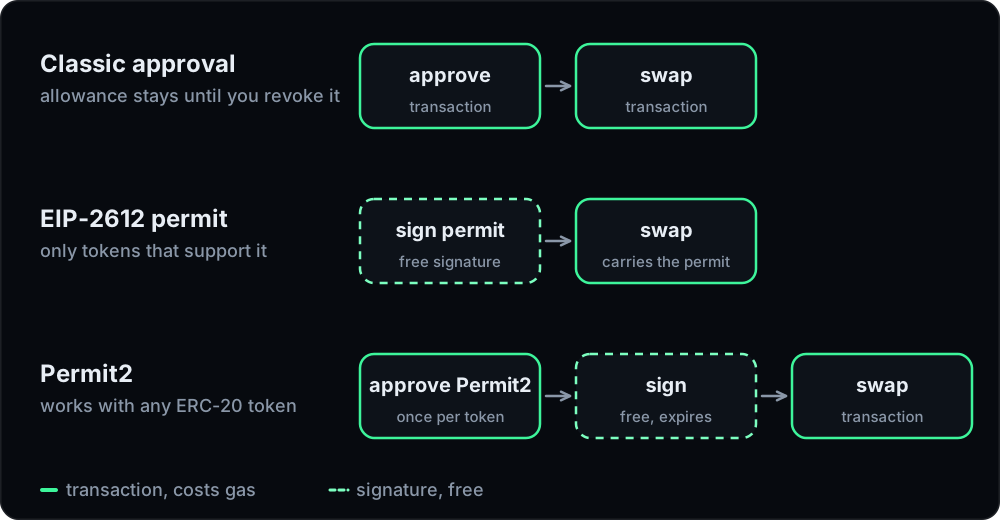
The oldest pattern is two transactions: one approve, then the swap. It works with every token, and it has two weaknesses.
It never expires. The Ethereum Foundation's guide to revoking token access puts it bluntly: there are no expiration dates on contract permissions, and an allowance can be used years after you granted it. Disconnecting your wallet from a website does not remove it.
Unlimited approvals are common. Many interfaces ask for the maximum possible amount so that you never have to approve again. That is convenient until the approved contract is hacked or turns out to be malicious. Then every token of that type in your wallet is exposed, including far more than the amount you meant to trade. The same guide recommends never granting unlimited access and revoking allowances regularly.
There is also an old edge case. If you change an existing allowance from one non-zero value to another, a spender watching the mempool can try to spend the old allowance before your change lands and then spend the new one too. ERC-20 itself suggests setting the allowance to zero first in that situation. Some tokens enforce it and refuse to change one non-zero allowance to another.
2. EIP-2612 permits
EIP-2612 fixes the two-transaction problem for tokens that adopt it. It adds a permit function that sets an allowance from a signed message instead of a transaction from your wallet.
You sign a structured message in the EIP-712 typed-data format. It names:
- the owner (you) and the spender (the contract you allow),
- the value you allow,
- a nonce, so the same signature cannot be replayed,
- a deadline, after which the signature is worthless.
The signature is bound to one token contract on one chain through its domain separator. Signing costs no gas. The swap transaction then carries your signature, calls permit and pulls the tokens in the same transaction. One transaction instead of two, and the allowance can be exactly the amount of the trade.
The catch is coverage. A token has to implement EIP-2612 for any of this to work, and most tokens do not. The standard also notes that anyone can submit your signed permit, the spender or anybody else. That does not change the outcome for you, but it means a permit is an allowance like any other once it is signed.
3. Permit2
Uniswap's Permit2 brings permit-style signatures to every ERC-20, including tokens without EIP-2612. It is a single contract deployed at the same address on many chains, and Uniswap's deployment list includes BNB Chain:
0x000000000022D473030F116dDEE9F6B43aC78BA3
It works in two layers:
- One classic approval to Permit2 itself. You approve the Permit2 contract on the token once, often for the maximum amount.
- Signed allowances per application. From then on, each application asks you to sign a Permit2 message. In the allowance mode it names the token, the spender, an amount, an expiration for the allowance and a nonce, plus a separate deadline for the signature itself.
Those two time limits are easy to confuse. The signature deadline is the last moment the signature can be submitted. The expiration is when the allowance it creates stops working. After that, any transfer using it reverts and the application has to ask you again.
Permit2 also has a one-shot mode, where a signature authorises a single transfer and nothing is left behind afterwards.
How signatures get abused
Signatures are convenient because they cost nothing and leave nothing on chain when you make them. That is exactly what attackers like about them.
MetaMask's support page on signature phishing describes the pattern: an attacker gets you to sign an off-chain message and uses it later to take your assets. Because signing is not recorded on chain, there is no trace until the attacker acts, and a Permit2 signature can stay valid for as long as its expiration allows. A permit request can look like a harmless login prompt.
The scale is real. The security firm Scam Sniffer reported about $494 million taken by wallet drainers in 2024, with permit signatures as the most common method of token phishing.
Before you sign any typed message, read it:
- Which domain? The token, or Permit2, and the right chain.
- Who is the spender? It should be the contract of the application you are using, nothing else.
- How much, and until when? An unlimited amount with a long expiration deserves a second look.
- Did you start this? A signature request that appears when you only meant to connect a wallet is a red flag.
How Tirio handles approvals
We use all three mechanisms, and the app picks one per token and wallet.
- Permit2 by default. You approve the token to Permit2 once. After that, the app asks you to sign a Permit2 allowance for Tirio's Router that lasts 30 days, so you are not asked again before every swap. The amount in that signature is the maximum Permit2 allows, which is why the Router's own rules matter: it can use the allowance only inside a swap you send yourself, only for the token you are selling and only up to that swap's amount.
- EIP-2612 where the token supports it. You sign, and the swap carries the permit. No approval transaction at all.
- Direct approval if you prefer it. In settings, the Direct option approves the Router itself, for the exact amount of the swap by default. Unlimited approval is an opt-in switch.
Before you see a signature request, the app checks the message field by field: the chain, the token or Permit2 as the domain, your account as owner, the Router as spender, an amount that covers the swap and a deadline no later than the quote's. The Router can pull only the token you are selling, only up to that swap's amount and only inside the swap you sent. The details are in our security docs.
Allowance hygiene, in practice
- Look at what you have approved. BscScan's token approval checker lists the contracts allowed to spend your BEP-20 tokens and lets you revoke each one. Other approval managers do the same.
- Revoke what you no longer use. Revoking a classic approval means approving zero. It is a transaction and costs a little gas.
- Clean up Permit2 too. Revoking the token's approval to Permit2 shuts off every Permit2 allowance for that token at once. Permit2 also has its own controls: setting an allowance to zero, a
lockdownthat zeroes several at once, andinvalidateNoncesto cancel signatures that have not been used yet. - Prefer exact amounts for contracts you use rarely, and expiring allowances over permanent ones.
- Treat every signature like a transaction. It may not cost gas, but it can move your money later.
For the rest of the swap flow, see our guide to reading a swap quote. The glossary has short definitions of approvals, permits and Permit2.