A tour of the trade page: chart, order book, depth and trades
A pair's chart, Tirio's order book, pool depth, recent trades and an order panel on one screen. What each panel shows and where its data comes from.
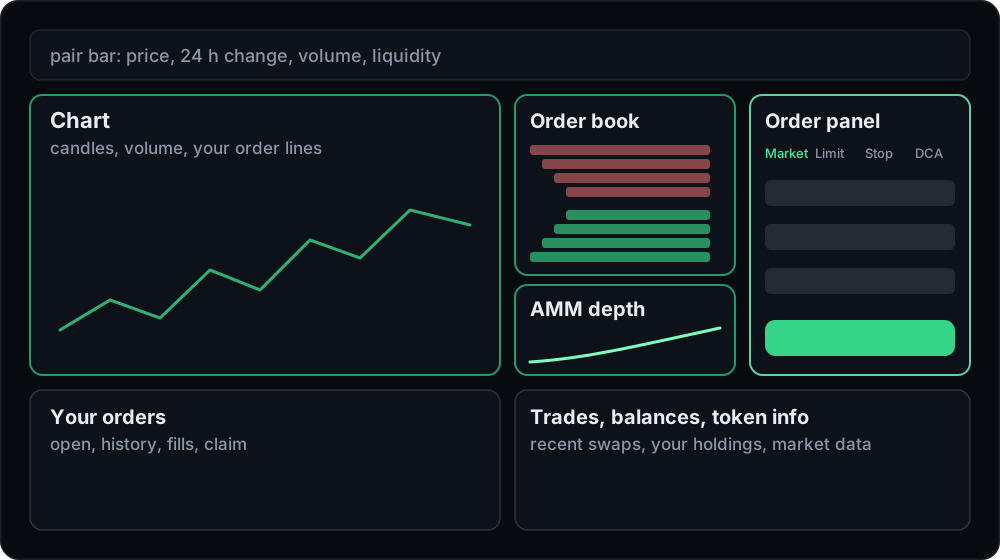
The swap card on tirio.io is built for one thing: get a good price for a trade, quickly. The trade page is built for looking at a market before you act. It shows one pair at a time, with a chart, Tirio's own order book, the depth of the pools that back it, recent trades and an order panel that can place swaps, limit orders, stops and DCA schedules. Like the swap card, everything happens in your browser and your wallet.
This is a tour of the page, panel by panel.
Opening a pair
The address names the pair: /trade/BNB-USDT opens BNB priced in USDT. Token addresses work too, so any pair Tirio can route can be opened directly. In the pair bar, click either token to pick another one, or press ⇄ to flip the pair. From the swap card, the Pro ↗ link opens the card's pair here.
Reading prices: quote per base
Every number on the page uses one convention: the amount of the quote token for one base token. On BNB/USDT that is USDT per BNB. Buy pays the quote token and receives the base token, Sell does the opposite. When you buy, the price you type is a maximum. When you sell, it is a minimum. The chart, the order book, the trades and your orders table all read the same way, so a number means the same thing wherever you see it.
The pair bar
Across the top: the last price, the 24-hour change, high and low, the 24-hour volume, and the liquidity of the pair's main pool. They are computed from the same candles the chart draws, so the bar and the chart agree.
The chart
Candles and volume, drawn with TradingView's Lightweight Charts, in timeframes from one minute to one day (15 minutes by default). Scroll left to load older candles.
- Recent candles are built from swaps that Tirio records on the pair's most traded pool, block by block.
- Older history comes from GeckoTerminal's public market data, fetched by Tirio so that your browser never contacts GeckoTerminal. Where both exist for a candle, Tirio's recording is used.
- Your open orders on the pair appear as dashed lines at their prices: limits, stops and take-profits.
The order book and AMM depth
The order book lists the limit orders makers have chosen to list on Tirio's book: asks above, bids below, each level with its size and number of orders, and the spread in between. These are real on-chain orders, and any Tirio swap can take them at exactly the maker's price. Click a level to copy its price into the Limit form. The book refreshes every five seconds.
Below the book, AMM depth shows the other half of the liquidity: how far the pool price moves as you buy or sell more of the base token, for trades from about $100 to $300,000 on each side. Swaps route through both the pools and the book, so together they show what a trade of a given size will meet. Our post on concentrated liquidity explains why that curve is rarely a straight line.
Recent trades
The latest swaps on the pair's main pool, each with its price, size and time, green for buys and red for sells, and a link to the transaction on the explorer. When fewer than 50 have been recorded yet, older trades from GeckoTerminal's data fill the list.
The order panel
Four tabs, with a Buy and Sell switch beside them.
- Market is a swap: type an amount, or use 25 %, 50 %, 75 % or Max of your balance, and the panel shows the output, average price, price impact, the 3 bps Tirio fee, the network fee and your slippage setting. Review fetches the simulated quote, which adds the minimum received. From 5 % price impact a notice appears, and from 15 % you have to confirm before the button works.
- Limit, Stop and DCA place orders. Before a limit or stop order can be placed, the form reads the market price for your amount so it can warn you about a price that would fill at once or a stop that would trigger immediately. Each warning has to be accepted for that exact order. Our step-by-step orders guide covers every field.
While a swap or an order is being signed, the page holds still. Clicks on the book, tab and pair changes are ignored, so the form can never change under the transaction you are signing.
Your orders, balances and token facts
Below the panels:
- Your orders in three tabs: Open, with cancel, and pause, resume and edit for DCA, History, and Fills, with links to every payout on the explorer. A payout that could not be delivered shows a Claim button.
- Balances of the listed tokens your wallet holds, with USD values. Balances under $1 are hidden unless you untick the box.
- Token info for both tokens of the pair: USD price, 24-hour change, market cap, fully diluted value, liquidity, 24-hour volume and the contract address with an explorer link.
Where the data comes from
| Panel | Source |
|---|---|
| Chart and pair bar | swaps Tirio records, older history from GeckoTerminal |
| Trades | swaps Tirio records, topped up from GeckoTerminal |
| Order book and depth | the Orders contract and the pools Tirio routes through |
| Token info | GeckoTerminal market data |
| Balances, quotes, orders | the chain and Tirio's API |
Tirio passes GeckoTerminal only public pool and token addresses. Your IP address and wallet are not passed on, and the app sends no telemetry.
When to use which screen
Use the swap card when you know what you want and want it done. Use the trade page when you want context first: how the price has moved, how deep the market is at your size, whether resting orders sit near your price, or when you want a stop or a take-profit. Both send the same kind of transaction, simulated before you sign and settled in one step.
The trade page documentation describes every control in detail.